K53 NEXT · SOUTH AFRICA

K53 practice.
Confidence for test day.

Learn road rules, recognise signs and understand your vehicle controls. Prepare for your learner’s licence with focused practice on Android or your iPhone.

How to install on iPhone·Start in your browser

Free daily practiceCode A, B & C
THE IPHONE WEB APP
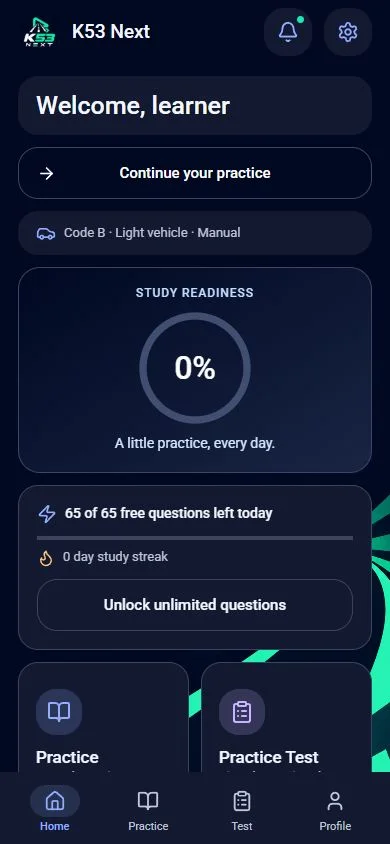
Current K53 Next web app showing study readiness and practice options
A little practice, every day.Build your confidence one question at a time.
1,600+questions across vehicle paths
3core study categories
64questions in a full mock
Your pacetimed or untimed practice
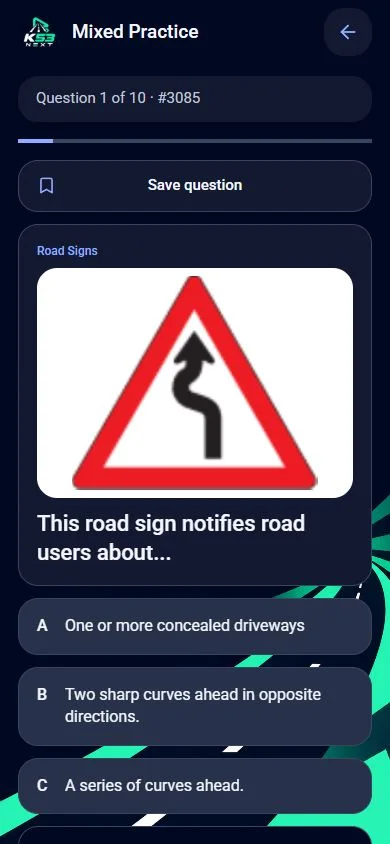
K53 Next practice question with answer options and a road-sign image
Actual practice screen from the web app.
UNDERSTAND EACH ANSWER

Make every
question useful.

Choose a topic, read carefully and learn from your mistakes. Your saved questions and weak areas help you decide what to revisit next.

  • Study your vehicle pathMotorcycle, light motor vehicle or heavy motor vehicle.
  • Return to tricky questionsUse bookmarks and mistake review to focus your next session.
  • Keep your progress togetherSign in with the same account to sync the current Android and web apps.
Explore K53 Next
ANDROID AND IPHONE

Your phone.
Your next step.

Choose the version for your device. Both give you a familiar K53 Next study experience.

AndroidOn Google Play

Download.
Open. Start learning.

Get the Android app from Google Play, with study material ready on your device.

  1. Open the K53 Next Google Play listing.
  2. Install the app and choose your vehicle.
  3. Start practising, then return to your weak areas.
Get it on Google PlayExplore the study features

On a computer, or prefer to start right away? Use K53 Next in your browser

BEFORE TEST DAY

Find your study path.

Use our practical guides and original study sources alongside your app sessions.

OFFICIAL STUDY SOURCES

Official learner-driver manuals

Use the original South African Department of Transport manuals alongside K53 Next practice. The free PDFs below are provided for study and keep the original Department of Transport copyright notice.

Section 1

Rules of the Road

Official South African learner-driver guidance on road rules, duties, traffic behaviour and road safety.

Download free PDF ↗
Section 2

Road Traffic Signs

The official road-traffic-sign manual for learning sign families, meanings and driver responses.

Download free PDF ↗
Section 3

Vehicle Controls

Official learner-driver guidance on vehicle components, controls and motorcycle controls.

Download free PDF ↗

These files are free to download for study and are not sold or altered. They are dated June 2012 and include their own Department of Transport copyright notice. Keep that notice intact, and use current official government or DLTC guidance for booking, fees and test-day requirements.

GOOD QUESTIONS

A few things
before you start.

Installation, free practice, offline study and your account.

More answers
Can I use K53 Next on Android and iPhone?+

Yes. Get the Android app from Google Play. On iPhone, open app.k53next.co.za in Safari, choose Share and Add to Home Screen, then open the K53 Next icon.

Is K53 Next free to use?+

Free practice is available, with daily limits. Purchased Premium adds unlimited practice and removes adverts. The Android Google Play checkout shows the current purchase terms; new purchases in the iPhone web app are not yet enabled.

What can I study?+

Practise road rules, road signs and vehicle controls. Choose motorcycle, light motor vehicle or heavy motor vehicle study paths, labelled Code A, B and C in the app.

Can I study offline?+

The Android app includes its study content. In the web app, keep the first visit online while the study material downloads. Core questions and pictures can then be used offline. Sign-in, cloud sync, updates and notifications need an internet connection.

Will my progress work on both platforms?+

Sign in with the same K53 Next account and sign-in method to sync progress between the current Android app and web app. Existing verified Android Premium is recognised by the web app. Guest progress stays on its own device; older Base44 web accounts remain separate.

Can the iPhone web app send study reminders?+

Yes, after you install it on your Home Screen and allow notifications on that device. Tap the bell to choose daily study reminders, their South African delivery time, and app updates separately. iPhone web notifications need iOS 16.4 or later.
YOUR NEXT STEP

A little practice.
More confidence.

Choose Android or the iPhone web app and start your next study session.